Manage your business in one place.What is SawaAfrik?
Money template
Project / job costing: Excel workbook
The project / job costing is a paid, multi-sheet Excel workbook for a Kenyan business: budget vs actual per job, with billed, collected and margin.
A job finishes and you cannot say whether it actually made money.
Paid workbook
Price unavailable
One-time, M-PESA or card. No sign-in.
Payment is temporarily unavailable. You can still recover a verified earlier purchase below.
Already paid? Recover your download
Worked example preview
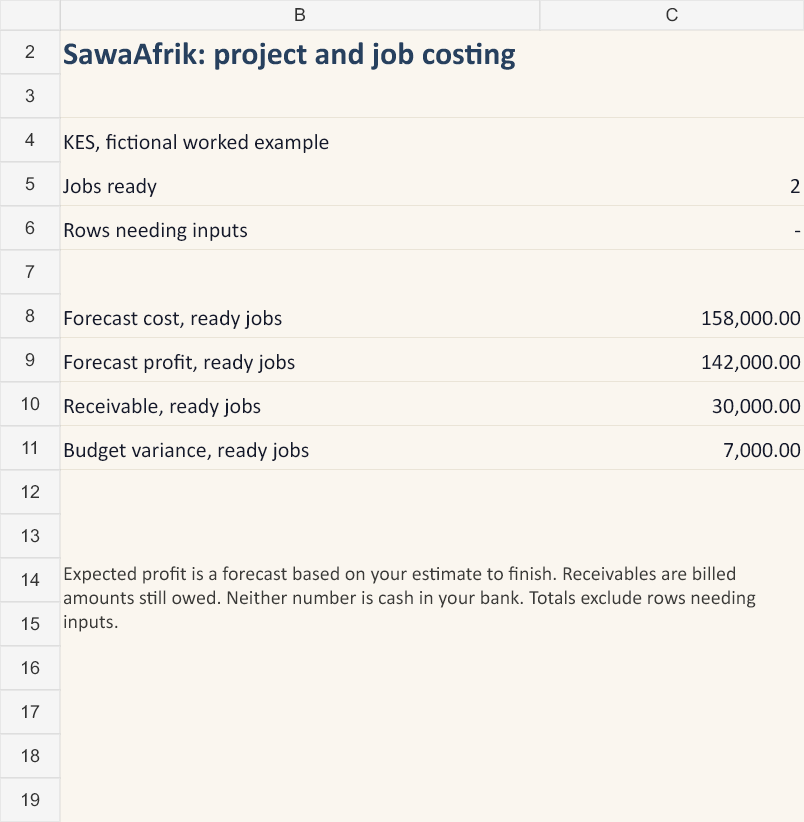
Forecast cost is actual cost plus your estimate to finish. The workbook calculates forecast profit, margin, budget variance and billed amounts still owed. Duplicate IDs, missing required inputs and collections above billing need review. Up to 50 jobs in the prepared input rows. The preview uses fictional figures.
What is in the workbook
Dashboard
Forecast cost, profit, customer receivables and budget variance for complete jobs.
Jobs
Budgets, actual costs, remaining cost estimates, billing and collections with calculated margins.
Start Here
Worked-example instructions and definitions of forecast profit and billed receivables.
Fields and schedules
How to use it
- 1Replace or clear the fictional jobs, then enter a unique ID for each of your jobs.
- 2Enter contract value, budgets, actual costs and the remaining cost estimate on one consistent VAT basis.
- 3Record amounts billed and collected. Enter an explicit zero cost to finish for completed jobs.
- 4Resolve rows needing inputs, then review each job's margin and the Dashboard totals.
Questions
- How do I track budget versus actual?
- Enter material, labour and other budgets, actual costs, your remaining cost estimate and amounts billed and collected. The professional workbook calculates total budget, forecast cost, profit, margin, billed receivables and budget variance. Missing required inputs and duplicate IDs remain visible for review.
- Is the project / job costing free?
- This is a paid workbook. Its current price is temporarily unavailable. Payment stays disabled until the price can be confirmed.
- What is inside the project / job costing workbook?
- Dashboard, Jobs, Start Here. Forecast cost is actual cost plus your estimate to finish. The workbook calculates forecast profit, margin, budget variance and billed amounts still owed. Duplicate IDs, missing required inputs and collections above billing need review. Up to 50 jobs in the prepared input rows.
- Does it work in Google Sheets and on my phone?
- The file uses standard spreadsheet formulas and no macros. A desktop spreadsheet app is recommended for the wide input schedules. On a phone, use the Dashboard to review the figures and a larger screen to edit detailed inputs.
- Which calculations are included?
- Forecast cost is actual cost plus your estimate to finish. The workbook calculates forecast profit, margin, budget variance and billed amounts still owed. Duplicate IDs, missing required inputs and collections above billing need review.
- How is this different from the SawaAfrik app?
- This workbook is a separate file you fill in yourself. It does not synchronize with a SawaAfrik workspace or your bank. The workspace lets you record invoices, payments and expenses as shared business records.
Related workbooks
- View
Cashbook
Every shilling in and out, with M-PESA/receipt reference and category.
- View
Sales register
Invoices raised with VAT, amounts paid and balances, eTIMS-aware.
- View
Expense register
Every cost with input VAT, supplier PIN and the eTIMS invoice reference.
- View
Petty cash book
Small cash out with vouchers and a running float.
Want it built to your exact workflow, in your branding? We make custom workbooks, documents and software on the same registry-backed, audited platform.
Work with us